Hello again! For this week’s reflection, I want to focus on teasing out the differences and similarities between the educational technology models we have been discussing:
- Technology Integration Matrix (TIM)
- SAMR Model (Substitution, Augmentation, Modification, and Redefinition)
- TPACK Model (Technological, Pedagogical, and Content Knowledge)
- CoI (Communities of Inquiry)

I feel like this week of class was quite content heavy, and I wanted to make sense of it and create a guide for myself to refer back to as I move into practicum. I expanded on TIM and SAMR below. I have also tried to add concrete examples of each aspect of the models… how might I take them into consideration in the classroom?
Here are my key takeaways:
Technology Integration Matrix (TIM)
TIM is a framework that has two parts. First, it describes essential characteristics for learning environments that involve technology.
- Active – students are actively using technology as a tool for learning. I think this means that just playing a video for students isn’t necessarily an effective way to include technology in the classroom, because they’d be passive participants.
- Collaborative – students use technology to work together. E.g., collaborative platforms like Padlet and websites that create word clouds (like this one).
- Constructive – technology helps students to build knowledge and connect ideas. Here, I think it’s about making sure your tech use isn’t just fun and games, but offers substantive opportunities for thinking. I found a resource called Miro, which has a digital whiteboard feature for visually connecting ideas.
- Authentic – learning tasks are connected to a real-world context. This one resonates with me. I want to give students opportunities to use technology to help with the problems they face in their own lives. E.g., use online databases to research the climate crisis, create digital infographics raising awareness about social justice issues, email local politicians.
- Goal-directed – technology is used to help students plan and assess their learning. E.g., Google Classroom – a great way to provide checklists and hand out self-assessments.

Second, our good friend TIM describes levels of Technology integration:
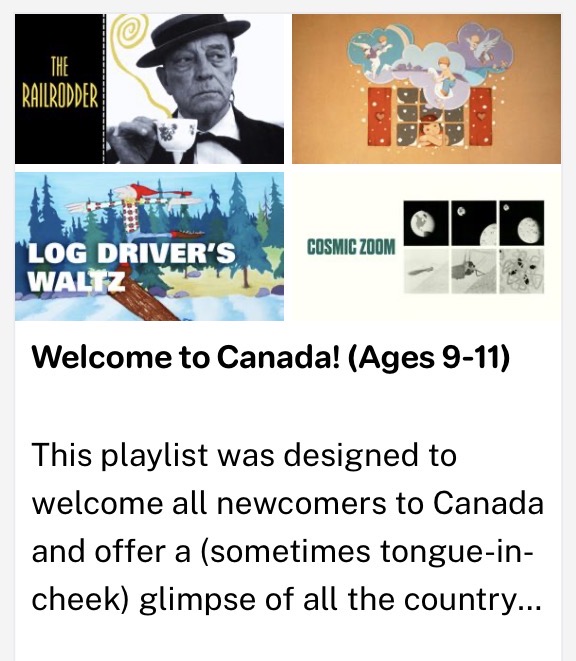
- Entry – teacher uses tech to deliver content. E.g., me showing my students in Sweden a video from the National Film Board via smartboard.

- Adoption – students use tech in guided and conventional ways. E.g., my students use a word processor to write an essay about Canada.
- Adaptation – students independently explore and use technology tools. E.g., I get students to create their own Canadian Heritage Moment-inspired video using iMovie.
- Infusion – students independently explore and use tech tools. E.g., I offer my students time in groups to create a website – they can use whatever tools they like.
- Transformation – technology enables innovative learning not possible otherwise. Here, I’m stumped! But I’m going to give it more thought, because it seems that the deeper you can integrate technology, the more genuine and impactful it is for learning.
SAMR Model
SAMR helps teachers evaluate how their use of tech in the classroom changes learning tasks. There are four levels, and they remind me a lot of the ones in TIM.
- Substitution: tech replaces a traditional tool, but there’s no functional change happening. That’s like giving my students laptops to write a long-answer quiz with essay questions. The learning task is the same, they’re just typing instead of handwriting.
- Augmentation: tech replaces a tool with functional improvements, e.g., typing those same essay questions, but using Grammarly, so students are learning where they’re making grammatical errors and how they can improve their sentence structure.
- Modification: tech redesigns the learning task in a significant way. A way I could implement modification is making the quiz collaborative by having students use Google Docs and edit their responses collaboratively in real-time. This might be more useful than Grammarly – that way, students are actually practicing editing, rather than outsourcing that thought process.
- Redefinition: tech enables learning tasks that wouldn’t be possible otherwise. Here is tricky again – like the Transformation level in TIM. I (shamefully) asked ChatGPT for an example of a use of tech that redefines a learning experience. It said, “Example: producing multimedia projects shared globally.” This makes sense. Here is a project idea for my practicum students – they could use the Canva app to film and edit “day in the life” videos, across continents! My friends Sasha and Nathan are doing their 6-week practicums in Tokyo and Taipei respectively. How cool would it be for my Swedish students to collaborate with their students, like pen pals, but with another whole multimedia aspect that would not be possible without tech?
I didn’t get to Communities of Inquiry or TPACK, but I feel satisfied with my weekly reflection, so I’m gonna end the blog post here! Finally, I used ChatGPT to create a comparison table of the models we discussed in class for future reference, and to briefly outfit the two models I didn’t reflect on.
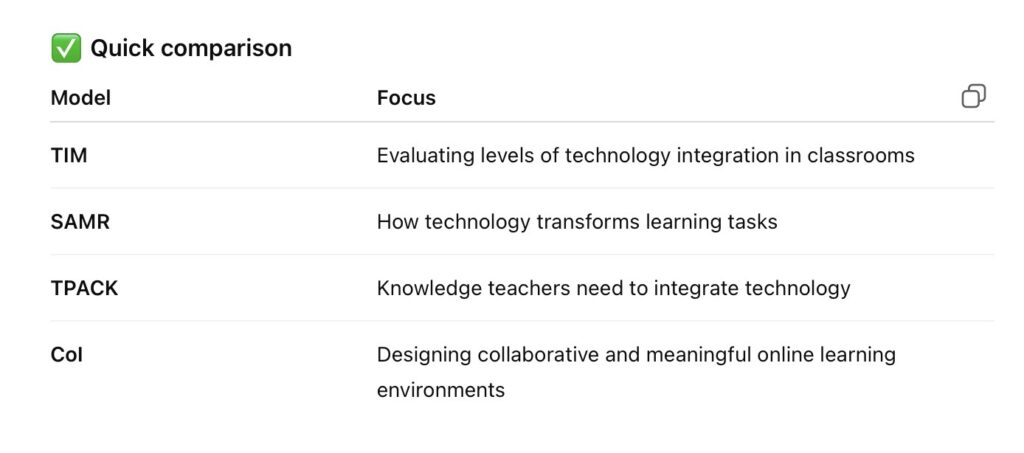
ChatGPT output – summarizing TPACK and CoI
TPACK Model (Technological Pedagogical Content Knowledge)
Purpose
- Explains the knowledge teachers need to integrate technology effectively.
Three Core Knowledge Areas
- Content Knowledge (CK) – Knowledge of the subject being taught.
- Pedagogical Knowledge (PK) – Knowledge of teaching methods.
- Technological Knowledge (TK) – Knowledge of digital tools and technologies.
Overlap Areas
- PCK – Pedagogical Content Knowledge (how to teach the subject).
- TCK – Technological Content Knowledge (how tech relates to the subject).
- TPK – Technological Pedagogical Knowledge (how tech supports teaching strategies).
Center of the Model
- TPACK – Integration of technology, pedagogy, and content for effective teaching.
Key Idea
- Effective teaching with technology requires balancing all three knowledge types.
CoI (Community of Inquiry Framework)
Athabasca University
Purpose
- Framework for designing meaningful online and blended learning environments.
Definition
- A learning community where participants collaborate and reflect to construct understanding.
Three Core Presences
- Cognitive Presence
- Students construct meaning through reflection, discussion, and inquiry.
- Focus on critical thinking and knowledge building.
- Social Presence
- Students present themselves as real people and build relationships.
- Encourages communication, trust, and collaboration.
- Teaching Presence
- Instructor designs, facilitates, and guides learning activities and discussion.
Key Idea
- Effective online learning happens when all three presences work together.


Leave a Reply