
Welcome to Week 4 of our Class! This topic is top of mind for many educators are struggling to deal with how to address it with their students’ assignments, whether they don’t want their learners to use GenAI or if they want to model the responsible and ethical use of GenAI. I like to think of GenAI tools as double edge swords; powerful tools that can make experts more efficient, and at the same times dangerous in the hands of people using it in areas where they don’t have expertise.
We will explore the use of Generative AI (GenAI) to assist with student learning as well as consider ethical considerations such as plagiarism, privacy, and environmental impacts. In the hands-on portion of the class, we will experiment with GenAI tools as well as evaluation their outputs for accuracy and biases. The workshop will also cover UVic AI policies, attribution methods, and campus support services, to encourage informed, mindful and responsible GenAI use.
Topic 4 Learning Objectives:
- Understand GenAI: Define GenAI & it’s limitations.
- Explore Use Cases: Describe possible use cases for GenAI in school settings for teachers & learners.
- Using GenAI Effectively: Demonstrate how write effective prompts for GenAI tools for academic & instructional purposes.
- Evaluate Quality & Reliability: Demonstrate how to critically evaluate the outputs of GenAI tools, for things like accuracy, relevance, & biases.
- Ethical & Environmental Considerations: Describe some of the issues around the responsible use of GenAI in education.
- Attribution: Cite outputs from GenAI tools.
Pre-Class:
What is Generative AI?
Please watch the following videos in preparation for our in-person class time on Friday. I don’t personally agree with all the claims in every video (especially the GenAI in Education video), so please critically reflect on the information in the videos, and make note of things that you agree with, or don’t agree with given your current understanding of how GenAI might be or not be useful in educational settings.
The total watch time is 21 minutes (with a 10 min optional video), and feel free to turn on closed captioning if you find that helpful (I know that I do).
Generative AI Overview (3 min)
AI Will Set Education Back 2500 Years… And That’s a Good Thing | TEDx University of Windsor (13 min)
Generative AI & Academic Integrity at Texas A&M University (5 min)
OPTIONAL video to go deeper on how AI and GenAI tools work: What different types of Artificial Intelligence (AI) & how Generative AI relates to other forms of AI (10 min)
OPTIONAL: This is an excellent document published by UNESCO about their new AI Competency Frameworks for Students & Teachers. Be sure to review the table of contents of the teachers’ document at the very least.
Class Time:
Lecture Video
(42 min)
Hands-on Lab Time:
Prompt Design Basics
 While it is easy to get started using Generative AI tools, it takes time and practice to get the best results out of Generative AI tools. Here are some key principles to keep in mind as you create your own prompts:
- Be Clear & concise in your language to avoid ambiguity:
- Poor: “Weather?”
- Better: “What is the current weather in Victoria, BC, Canada?
- Provide Specific details to guide the AI toward the desired response:
- Poor: “Tell me about the weather.”
- Better: “Provide a detailed weather forecast in 500 words or less, for Victoria, BC, Canada, for the next three days, including temperature, precipitation, and wind speed.”
- Include relevant Context & Instruction to help the AI understand the prompt better:
- Poor: “Tell me about the weather.”
- Better: “I am a teacher teaching grade 2 students about the weather. Please generate a lesson plan for a one-hour lesson about weather including a 30-minute activity to help students remember what they learned in the instruction portion of the lesson.”
Let’s Practice!
- If you haven’t already, in your favourite web browser please open your favourite GenAI tool (if you have one). If you don’t have a tool that you prefer to use you can use Perplexity.ai without signing up for an account -OR- Microsoft Copilot. If you are a UVic student you can use a version of Copilot licensed for you by UVic by logging on with your UVic email address (e.g. noahsmith@uvic.ca). The UVic version of Copilot runs on servers located in Canada and does not share any of the prompts you create with Microsoft, or resulting data for training data, which is great from a privacy perspective. Perplexity is a great option if you don’t want to use a login, but does not allow you to generate images like the UVic version of CoPilot.
Note: You are free to use other GenAI tools for this workshop but please note that you will either have to create accounts for most of these services if you have not already done so, and will need to take extra steps to preserve your privacy if privacy is important to you: - Test a poor prompt to start with. Copy and paste the following text into your GenAI tool and note the results:
Tell me about the weather.
- What are the results from this prompt telling you?
- Now let’s try a prompt that includes more details relevant to the hypothetical help we need by copying and pasting the following text into your GenAI tool:
I am a teacher teaching grade 2 students about the weather. Please generate a lesson plan for a one-hour lesson about weather including a 30-minute activity to help students remember what they learned in the instruction portion of the lesson. Please provide sources.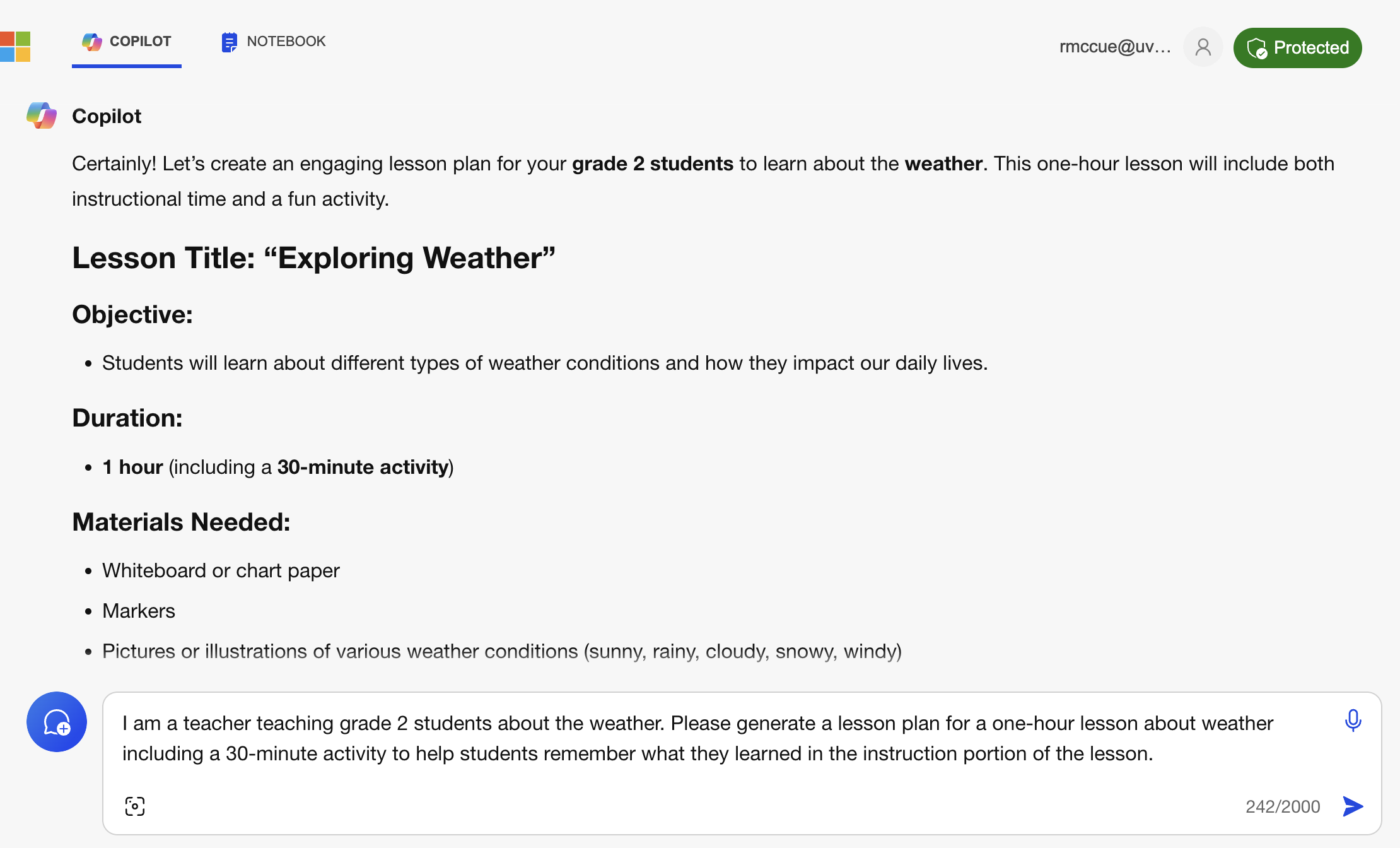
- How does the response to this prompt differ from the “poor” prompt above?
- Do you have the weather-related expertise to determine if the weather-related facts are accurate?
- Do you have the teaching expertise to know if the weather lesson plan is reasonable and will work well with grade 2 students?
Note: every time we use GenAI tools we should ask ourselves whether or not we have the expertise to evaluate the accuracy of GenAI-generated text, because as we know they are not always accurate or factual.
- Pick one or two topics that you know a lot about (e.g.
What are the origins of skateboarding?).- Ask Perplexity.ai -or- Microsoft Copilot a question about one of the topics.
- Is the answer accurate?
- Can you make it more accurate with follow-up prompts?
- Ask Copilot a question about your second topic.
- How did it do for each topic?
- Was it completely accurate?
- Did you have to research to verify any of the claims Copilot made?
NOTE: If you’d like to earn a workshop badge, please take a picture or screenshot of the prompt and output of one of the tropics you know a lot about as this is one of the criteria to earn a workshop badge.
More Effective Prompt Design Tips
Please practice each of the following tips by trying out the “poor” and “better” prompts to compare the outputs. If you have time take inspiration from each of the “better” prompts and modify them to use questions for topics that you are interested in, or know a lot about so that you can more easily check the responses for accuracy. Feel free to try modifying the prompts for topics or places that interest you.
- Clicking the New Topics button in your GenAI tool when you are asking a different question that does not build on any previous questions you’ve asked Copilot will generally give you better results:

- Set the Tone of the response you would like (e.g., formal, informal, humorous):
- Poor:
Weather in Paris. - Better:
Give me a lighthearted weather update for Paris, France, with a humorous twist. - Use your own prompt now and experiment with varying the tone you request.
- Poor:
- Incorporate examples or analogies to clarify complex concepts:
- Poor:
Explain cyclones. - Better:
Explain how cyclones form, using the example of Cyclone Nisarga. Please provide sources. - Use your own prompt now and experiment with requesting the GenAI use an example or analogy.
- Poor:
- Limit Scope to focus on a specific topic or task to prevent overly broad responses:
- Poor:
Tell me everything about weather. - Better:
Provide an overview of the factors that influence the formation of thunderstorms. - Use your own prompt now and experiment with limiting the scope of your request.
- Poor:
- Test and Iterate by experimenting with different variations of your prompt to see which yields the best results:
- Initial:
Weather in London. - Refined:
What is the weather forecast for London, UK, for the upcoming weekend, including any weather warnings? Provide sources. - Use your own prompt now and experiment with iterating or refining your request.
- Initial:
- Prompt Chaining by using the output of one prompt as the input for another to build on responses or refine results (much like a conversation):
- First Prompt:
What are the key factors that affect local weather conditions? - Second Prompt (following the first response):
Considering those factors, what is the likely weather forecast for San Francisco next week? Provide sources. - Use your own prompt now and experiment with prompt chaining.
- First Prompt:
- Leverage Precedents by incorporating elements of successful prompts you’ve used in the past:

by Copilot (2024)
- Previous Successful Prompt:
Explain the concept of EL NIÑO and its impact on global weather patterns. - New Prompt (leveraging precedent):
Explain the concept of LA NIÑA and its impact on global weather patterns. Provide sources.
- Previous Successful Prompt:
- Assign a role to the GenAI to the tool in order to provide additional context for the result:
You are the head of a creative department for a leading advertising agency... - Create an Image in Copilot (the free version of Perplexity.ai does not allow you to generate images). The image to the right was created by Copilot using the prompt below. Be sure to take a close look at the child’s left hand, and notice the extra finger that Copilot has accidentally included. GenAI image generators will sometimes do weird things. (Note: The free version ChatGPT (3.5) as of March 2024 does not allow users to generate images):
- Successful prompt:
Create an image of a grade 2 student learning about the weather. - Use your own prompt now and experiment with creating your own images.
- Successful prompt:
Let’s Practice Some Advanced Prompt Design skills!
Now let’s look at how we can use GenAI tools for creativity and innovation, including how to generate new ideas and overcome creative blocks (ChatGPT 4.0, 2024). Type or copy and paste the prompts below into Copilot and then let’s look at the results.
- Idea Generation: First let’s look at a technique to help us generate possible ideas for undergraduate honours research projects. Note that you probably won’t get any truly unique topics suggested by GenAI tools, however, they can be useful for brainstorming and may prompt you to think of other related ideas as you look at what the GenAI tool has suggested.
- Topic exploration:
I am an grade 4 teacher who just graduated from university and am getting ready to teach my first class of learners. I am interested in maker or makerspace activities to make math instruction more active learning. What are some topics of inquiry that might be interesting for me to suggest to my grade 4 learners? Please put suggestions in bullet form, and provide citations. - Now try exploring a topic that you are interested in with a prompt of your own!
- Topic exploration:
- Lesson Outline & Activities: ChatGPT can assist in expanding on a suggested topic and creating lesson plans.
I am a grade 4 teaching. Create a detailed lesson plan for "Create a board game: Students can design and create their own board game, incorporating mathematical concepts like probability, addition, subtraction, multiplication, and division. They can also explore concepts like rules, strategy, and game mechanics." Include detailed activity instructions using a grade 4 level vocabulary.- Now try using one of your own generated topics and request it to suggest research questions.
- A series of Lesson Plans:
I am a grade 3 teacher. Create an outline for 8 weeks of twice-a-week classes on the British Columbia Physical Literacy Standards for grade 3 learners.
- An Activity for one Lesson Plan:
Create a detailed lesson plan for week 1, day 1.- How did it do creating the a Lesson Plan outline for 8 weeks?
- How did it do and then a detailed lesson plan for week 1, day 1?
- Can you fact check the detailed lesson plan without looking at the BC Physical Literacy Standards?
- Summarize a document, but be very careful as currently (March 2024) free GenAI tools have limits on the size of documents that they can summarize. You can ask the GenAI tool to let you know if it can’t “read” the whole article to summarize it.
- Request a summary of an article titled, LEGO helps Langford man recapture life after induced coma in 2018, by opening the article, and copying the text of the article to use in the next step.
Please summarize the main points in this article. If you cannot summarize the whole article please tell me that you couldn't: https://www.saanichnews.com/local-news/lego-helps-langford-man-recapture-life-after-induced-coma-in-2018-7333837 - Follup with the following prompt requesting a more detailed summary:
Please expand the summary to 5 or more bullet points. - Are the two summaries significantly different? If so in what ways?
- Now try summarizing one of your own documents, or a web page!
NOTE: The standard version of Copilot (which UVic has licenced for us) is not able to summarize large bodies of text, including documents over approximately 3,100 characters (as of March 2024).
- Request a summary of an article titled, LEGO helps Langford man recapture life after induced coma in 2018, by opening the article, and copying the text of the article to use in the next step.
- Reflection Time:
- How useful were the research topic ideas that your GenAI tool created?
- Do you have enough background knowledge to critically evaluate the quality of Copilot’s suggested research topics?
- How useful were the research questions that GenAI tool created?
- Did you GenAI tool do a good job in summarizing the document?
Evaluate Quality & Reliability
Critically reviewing the outputs of language models like ChatGPT and Gemini can be challenging, but here are some strategies you can use (ChaGPT 4.0, 2024):
- Cross-Verify Facts: Cross-check the information provided by the model with reliable sources. If the information is inconsistent or cannot be found in reputable sources, it might be a hallucination.
- For instance, if ChatGPT claims that Toronto is the capital of Canada, cross-check with a reputable source like a government website or a geography textbook to verify that Ottawa is actually the capital.
- Cross-Verify Citations: Check to make sure that for each citation (and don’t forget to ask for sources):
- The source exists whether it be a web page, book, or journal article.
- The quotation or summary exists and is fairly represented by the GenAI tool.
- Expert Review: If you have access to subject matter experts, have them review the model’s output for accuracy and reliability. Even easier if you are a subject matter expert.
- Model Limitations Awareness: Be aware of the limitations of the model you are using. Understanding the types of errors or hallucinations a model is prone to can help you identify them more easily.
- Be aware that ChatGPT may struggle with very recent events or highly specialized knowledge, so take its answers in these areas with caution. In academic research specifically, please be aware that General GenAI tools do not have access to research papers behind paywalls, so in disciplines like Law where almost all peer review information (like legal commentaries) are behind paywalls, general GenAI tools perform very poorly.
- Critical Thinking: Apply critical thinking skills to evaluate the plausibility and coherence of the model’s responses.
- For example, if a GenAI tool claims that humans can live without water for a month, apply critical thinking to question the plausibility of this statement based on known human biology.
Remember, while these strategies can help reduce the likelihood of encountering hallucinations, no method is foolproof. Always use multiple sources and verification methods when relying on information provided by language models.
Let’s Practice Evaluating Quality & Reliability!

by Copilot (2024)
- Choose a topic that you know a lot about. For example: I know a lot about the manager of the UVic Libraries Digital Scholarship Commons, Rich McCue.
- Ask your GenAI tool a few questions about a topic that you know the answers to. For Example:
What is Rich McCue known for? - How did your GenAI tool do for your question?
- Can you change your prompt to help it produce a better response? For Example:
What is Rich McCue from the University of Victoria known for? - How did your prompt do after you refined it?
Let’s Practice Some Learner Assignments & GenAI
- Using a GenAI tool, pose an essential inquiry question to a GenAI & then evaluate the response for Quality & Reliability:
- E.g.
I am a grade 5 student starting an inquiry project. My enquiry question is: How do we affect our environment? Please provide citations with web links. - Follow-up prompt:
Provide more details in the specific impacts section. - Think about what a grade 5 student would need to do to critically evaluate the GenAI text.
- Could this be an activity to use as a GenAI literacy and/or Information literacy activity?
- E.g.
- Copy the text of one of your blog posts, or an essay you’ve written in the past and ask for suggestions on how to improve your writing:
I am a second year education student at university. I have written an essay and would like feedback on how I can make my writing clearer, better organized, using professional language: PUT YOUR WRITING HERE- How does the feedback from the GenAI tool look helpful?
- Would you make any changes based on the advice?
- Does any of the advice appear to be bad advice?
The MacBeth Assignment… The GenAI Edition

by Gemini 3.0 (2026)
Thinking back to Pat’s experience struggling with the MacBeth writing assignment, please answer the following questions to yourself:
- How could Pat’s teacher have used a GenAI tool to differentiate the assignment while still meeting the learning objectives for the assignment?
- What process would you go through to differentiate a typical assignment in an areas that you will be teaching?
- How much time would you estimate it would take you to create a custom assignment this way?
- Do you think it would take longer to give feedback on a custom assignment like this compared to the standard assignment (assuming the rubric stayed essentially the same)?
OPTIONAL: Create an Infographic for a Blog Post with NotebookLM
NOTE: This is an optional activity, and you will need a Gmail account to use Google’s NotebookLM in order to create an Infographic. The activity below is based on the following blog post.

by NotebookLM (2026)
How hard is it to create a professional looking free infographic based on a document you’ve written? Very easy, at least since Google released their infographic tool for their NotebookLM product in mid December 2025. just as long as you have 2 minutes of free time along with a document to give it and a Gmail account (here’s a step by step video tutorial if you’d prefer that to the written instruction below):
- Go to NotebookLM and login if necessary using your Gmail credentials.
- Create a new notebook.
- Add one of your blog posts URL’s (or web address) as a source for your notebook.
- Click on the pencil on the right side of the infographic button.
- Select the orientation for your infographic. I’ve found that the Portrait format produces fewer formatting errors for roadmap infographics than the Landscape format.
- Select the level of detail you want. The standard level of detail is my preference, but play around and see what would best suit you and your class.
- You can prompt it for a style, like a “road map metaphor”, or “cartoon style” for example. Have some fun!
- It will take a minute or two for the infographic to generate.
- Can you see any mistakes in the infographic? Any spelling errors?
A video tutorial of the steps above (2-min):
OPTIONAL: Create Jeopardy game categories & questions using class documents with NotebookLM
NOTE: This is an optional activity, and you will need a Gmail account to use Google’s NotebookLM in order to create an Infographic.
How hard is it to create a professional Jeopardy game for your class using either a document you’ve written or other online class materials? Very easy, at least with NotebookLM. just as long as you have 2 minutes of free time along with a document to give it and a Gmail account:
- Go to NotebookLM and login if necessary using your Gmail credentials.
- Create a new notebook.
- Add one of your blog posts URL’s (or web address) as a source for your notebook.
- Click on the pencil on the right side of the infographic button.
- Select the orientation for your infographic.
- Select the level of detail you want. The standard level of detail is my preference, but play around and see what would best suit you and your class.
- Add a prompt if you’d like to customize the infographic further.
- It will take a minute or two for the infographic to generate.
- Can you see any mistakes in the infographic? Any spelling errors?
- Now that you’ve created one version of an infographic for your course, play around with your NotebookLM prompt & settings to see if you can create something more interesting.
Other GenAI Resources for K-12 Teachers:
Here are some other GenAI related tools that you might find useful in creating lesson plans and performing other tasks mundane administrative tasks. I am not endorsing these tools, but want to make you aware of the types of tools that are currently available. Keep in mind that if you use any personally identifying information in your promppts of uploaded data, you’ll need to get the approval of your district IT coordinator before you use them in that way.
- Carl is a British Columbia based startup that is using GenAI in their product to help teachers in BC create instruction and activities that are aligned with the BC Curriculum, and when ask for conform to best practices for Indigenous ways of knowing and learning.
- TeachAid.ca, “A Canadian-specific AI assistant that focuses on lesson and assessment planning specifically for the Canadian context, often used for secondary school streams”
- Monsha.ai (Canadian edition), “helps teachers in Canada create curriculum-aligned lesson plans, differentiated resources, and assessments tailored to every province, language stream, and learner.”
If you know of tools that work well for you, please let me know so that I can add them to this list.
Learning Pod Meeting:
- Spend 5-10 minutes today with your learning pod members and discuss this week’s topic, and feel free to use the blog prompts in the homework section below to get your discussion going. If you’d like you can make some notes for your blog post during your discussion while your thoughts and ideas are fresh in your mind.
- Have you talked about possible topics for your Assignment 2: Educational Technology presentation?
Homework:
- Weekly critical reflection blog post to document your learning in class and to document progress on your inquiries (incorporate audio, video, screen video capture, or other multi-media elements into your blog post this week).
- Review the 336 Blog Post Rubrics to make sure you’re including all the minimally required elements for your weekly blog posts.
- After you’ve drafted your blog post, OPTIONALLY you can ask a GenAI for suggestions on how to improve your post (hint: as a follow-up prompt you might want to provide the the GenAI with the assignment rubric to get additional relevant feedback on your writing)
- Use two or more blog prompts that follow it for your critical reflection (pros & cons for all technologies or pedagogies), or your own prompts if you’d like to discuss something else related to GenAI in education:
- What are some of the major limitations of GenAI?
- Describe possible use cases for GenAI in school settings at the grade level you would like to teach or describe why it would not be appropriate for your grade level.
- Talk about how you’ve found GenAI useful or not for educational purposes.
- What are some of the issues around the responsible use of GenAI in education including, the environment, property rights, and learning-related issues
- How would you have created a differentiated assignment for Pat if you were their teacher in order to meet the learning objectives of the assignment, and not take up too much of your time creating the assignment and giving feedback to Pat?
- Use the category, “weekly-reflection“.
- Share your post with your learning pod at your next meeting (usually at the end of class time).
- Weekly Free Inquiry blog post:
- Document the start of your inquiry by:
- introducing your topic
- talk about why you chose your topic
- identifying your initial goals for your inquiry
- initial resources that you think you will use to assist you
- Employ a multimedia strategy in your post to help document your inquiry by using text and one or more other media to help make it more engaging (e.g., image, screencast, video, or other formats).
- Utilize social writing strategies such as hyperlinks to blog posts (e.g., trackbacks) or to articles/resources consulted, including web pages, images, videos, etc.
- Use the category, “free-inquiry”.
- Share your post with your learning pod at your next meeting (usually at the end of class time).
- Document the start of your inquiry by:
- If you haven’t already, please use PSII tools to start to plan your inquiry (and select a topic or two to choose from if you haven’t already)
- Look at the bottom of this page for Free Inquiry topics use in the past for inspiration.
- It is very important that you fill out the Learning Pathway & Consent before our next class so that I can publish the blog addresses on the course website for everyone who would like to be included in that. Even if you don’t want to be included, please fill out the consent form because there is other important information I need from you.


Leave a Reply