In class today we discussed Universal Design for Learning and how digital technologies can support inclusion and accessibility in classrooms through indpendent and group discussions. It was really interesting to learn about this information from a different perspective after completing my group project, a website on UDL and digital technology tools to support learning.
In Class Activity #1
Our first activity in class today was to explore what makes websites accessible for people who use text-to-speech features. We discussed and noted familiarity with voice-to-text features like captions on videos but many people fail to ensure accessibility for screen readers. There are lots of cool features on websites like headings which can let screen readers “skim” the text on a webpage for a general overview of content. We also discussed how images play a large role of media in today’s digital age however, to make images accessible to everyone, content creators need to write alt-text for images. Another key feature about images that people often forget is ensuring images have good contrast so that images are inclusive for everyone.
For the second part of the first activity, we were asked to test The Web Accessibility Evaluation Tool from Utah State University on three commonly used websites. I decided to compare The Saanich, Victoria, and Langford Recreation websites. Saanich website had an accessibility score of 2.3 out of 10. Victoria’s page had a score of 9.8 which a starking difference from. I had hope for Langford however, the website had an accessibility score of only 5 out of 10. Overall I was surprised that all of the websites were differed so much on accessibility. It was a really eye opening experience.
In Class Activity #2
Think back to your own K-12 experience. Did you use any adaptive technologies, or see adaptive technologies used in your K-12 classes or schools?
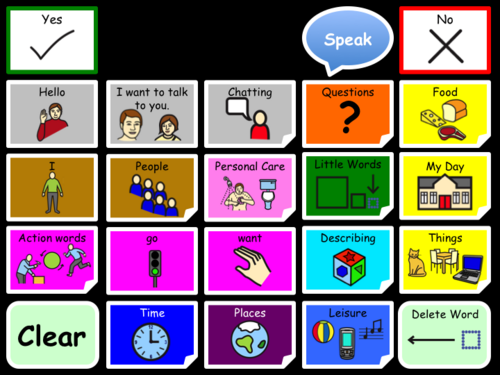
When I was in elementary and high school growing up I did personally not use any adaptive technologies. However, I did see some adaptive technologies used in my K – 12 classrooms. It was more popular and widely accepted when I was in high school. I noticed a lot of people who would use headphones when walking through the busy hallways or being in louder classrooms in schools. I noticed many people in our inclusion (BASES) classroom would use Aided AAC devices with applications such as Touch Chat or Proloquo2go. Overall, I think that in 2026 there are more options available now when it comes to assistive technology. Even compared to 2020 when I graduated from high school. I believe that with the COVID-19 Pandemic, it kind of jump-started a new era of digital technology.
/
In your practicums or previous experiences, how effective have adaptive technologies been in helping those with differing abilities?
When In Link2Practice, I noticed a lot of students openly using adaptive technologies to help support their learning. It is so much more common now than it was years ago to have text-to-speech apps that allow students to audibly listen to school readings or assignments to help support their reading. I think there were also some online platforms that I was told about by my Link2Practice teacher, but I unfortunately never got to see used in the classroom setting.
Toward the end of the video, one teacher uses the adaptive technology analogy of giving glasses to students who have problems. Does that explain adaptive technologies? Why or why not?
I’m honestly not too sure about this one, our group discussed this and wondered if when we were in school this might fit better? However, the videos we watched were 8 and 9 years old. Thus, being significantly outdated when you compare it to the resources and technologies available to schools today. This analogy stumped me, I wonder if there would be a better metaphor to use? I feel like although everyone’s vision is not the same glasses can still help and people need glasses for different contexts. For example, I have glasses and they help when doing school work, reading, and other close-up activities. However, my glasses are primarily for my far sighted vision and I need them when I drive or am looking at something in detail that is further away or a smaller object. But within the context of adaptive technologies, I am still confused with this metaphor.

What are some of the pros and cons of using adaptive technologies in schools?
Some Pros of using adaptive technologies in schools is that it greatly supports inclusion and UDL. It supports students agency and allows them to advocate for themselves and find a learning style that works for them. This is often through using adaptive technologies and makes accessing these materials much easier than in the past. Our group discussed how we don’t really see many direct “cons” of using adaptive technologies, moreso limitations. For example, schools might have a limited number of resources available and students have to share materials and cannot access these technologies as frequently? Or maybe the school has limited budget and cannot afford new adaptive technologies that would really benefit and support students? There are a lot of “what-ifs” with limitations and to truly know and understand if an adaptive technology will work for a student depends on many diverse factors teachers have to take into consideration.


Leave a Reply