
Hypothes.is
Hypothes.is is a very light-weight web service and browser extension that you can easily install in your own browser and then use to have conversations in situ on web documents such as blogs, articles, documents, websites, and other resources.
Sign up for hypothes.is. It’s free and easy and can be very useful as a social bookmarking tool.
1. Go to web.hypothes.is/start and click ‘Create a Free Account’

hypothes.is sign up
Enter a username, email address (this does not have to be your UVic address), and password. Click the checkbox to indicate that you agree to the linked policies … or don’t, but then you won’t be able to use hypothes.is. If you would like to protect your identity online, you may choose a pseudonym rather than your real name, or speak with your instructor about an alternative.
One logged in, you will need to make sure you have joined the private group being used for your class. For this class you should be using the ‘EDCI 335/565 January 2024‘ group. I have provided an invitation link to the group in the syllabus and inside Brightspace.
2. Add hypothes.is to your browser.
- Navigate to https://web.hypothes.is/start/
- If you use Chrome as your web browser, click the ‘Chrome Extension’ button. If you use Firefox or Safari, bookmark the ‘Hypothesis Bookmarklet’ by dragging it to your bookmarks bar, or right-click to bookmark the link.
- If you use Internet Explorer or Edge, download Firefox or Safari and use one of those instead. [Hypothes.is will probably work in IE or Edge, but those browsers are … stale, at best!]

Add hypothes.is to your browser
3. Start Annotating
Go to (almost) any webpage and launch the bookmarklet by clicking on it in your bookmarks bar. For this course, you will be asked to annotate the course readings, identifying things you want to flag for discussion, ask questions about, or reflect on.

hypothes.is Bookmarklet
Click the arrow in the top, right corner of your browser window to open the overlay.

Open hypothes.is overlay
If needed, sign in to the bookmarklet.

sign in to hypothes.is
It is important to ensure you are in the correct group when annotating. This will be visible in your browser sidebar and should srick once selected.

Select any text on the webpage, and click ‘Annotate’ then enter your comment. You can also reply to comments as needed.
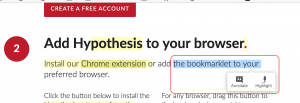
Select and Annotate Text
Engaging with hypothes.is Groups
For many of your courses, a group will be setup so that you can engage in annotation with your peers. Your instructor will likely send you an invitation at the start of the term. It is important to be mindful that you are annotating in the right group as you may end up in a few throughout the program.
Creating a Private Group (optional)
If you click ‘Post to Public’, your annotation is public. It is visible to anyone who has the hypothes.is bookmarklet active in their browser, and it is released under a Public Domain license.
If you want to have a private group with your Learning Pod or a specific team you can create one. You can create as many groups as you would like!
1. Click ‘Public’ at the top, and choose ‘New Private Group’.

Create a private group.
2. Give your group a name and tap ‘Create Group’.
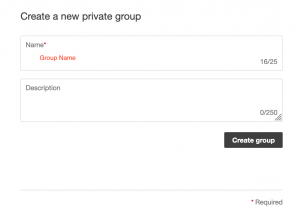
Name your group.
3. Copy the link to share.
Then you can close the tab or window.

Copy link to share.
4. Choose your new group from the dropdown.
- include a tag for easier searching
- click ‘Post to [Group]’.
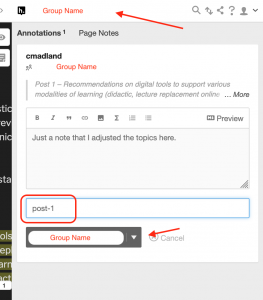
Select your group.
5. Click the arrow to reply to another annotation.
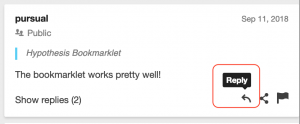
Reply to an annotation.
Happy annotating! See you on the web!

1 Pingback