
Topic 2 Learning Objectives:
By the end of this week you should be able to:
- Describe the basics of what interactive and multimedia learning are
- Familiarity with core Multimedia principles
- List examples of digital and non-digital interactive activities that can be used to help participants learn more effectively
- Design and create a screencast video for a class forum introducing yourself to the class
- Find multimedia tools for communication and teaching using different content forms such as text, audio, images, animations, or video
- Consider multiple tools as part of the process of creating multimedia
Introducing Topic 2:
As you are well aware this course focuses on multimedia learning theories and the application of various forms of media to teaching and learning contexts. Teaching and leaning context are often a classroom but are also common across many fields. Business for instance will often use multimedia to present content that they wish for their audience to learn about.
Establishing affective practices for designing and evaluating media based upon relevant theory and scholarship is something people can intern apply to their lives. Moving practice to include rich educational experiences is of value to many.
Recap Course Description/Goals
In the creation of instructional content for any learning outcome, it is common to use multiple mediums, including: text and images, video with audio, face to face presentations with slides. Why do we do this? Is there a benefit to using multiple mediums? Are there downsides?
In this course, we will consider these questions and more through an exploration of the history and current use of multimedia and digital interaction in learning.
At the end of the course, students will be able to:
- Create a variety of multimedia learning objects including, augmented reality, screencasts, infographics, podcasts, dynamic video and web-based learning games
- Demonstrate the application of the design thinking process in the creation of multimedia and interactive learning objects
- Evaluate the suitability of multimedia learning objects for specific use cases using evaluation rubrics and multimedia learning principles
- Recognize and describe principles of the field
- Contextualize the history of interactive and multimedia learning
- Contextualize theories and principles that support the use of interactive and multimedia learning
Defined as….
Multimedia is a form of communication that combines different content forms such as text, audio, images, animations, or video into a single interactive presentation, in contrast to traditional mass media which featured little to no interaction from users, such as printed material or audio recordings. Popular examples of multimedia include video podcasts, audio slideshows and animated videos. During this class we will discover how much is added to learning experiences when content is presented using elements of multimedia.
Richard E. Mayer of the University of California, Santa Barbara adds, “I define multimedia as presenting both words (such as spoken text or printed text) and pictures (such as illustrations, photos, animation, or video). By words, I mean that the material is presented in verbal form , such as printed text or spoken text. By pictures, I mean that the material is presented in pictorial form, such as static graphics, including illustrations, graphs, diagrams, maps, or photos, or dynamic graphics, including animation or video” (Mayer 2014, p.4). Mayer’s textbook is an important resource for understanding this and will be referenced many times during out class. This week it’s first chapter is on the reading list.

@bobbybarr
View profile@bobbybarr
Readings for this week:
Please read the articles below and think of how historical uses of of non-digital multimedia and interactive experiences (classroom, nature walks, brainstorming sessions, etc) could influence how we use digital technologies today.
- An article highlighting non-digital interactivity used in a classroom to increase learning (~4 min)
- Read an edited version of Chapter 1 of Mayer’s The Cambridge Handbook of Multimedia Learning, Introduction to Multimedia Learning (~25 min)
— Take special note of the Multimedia principles which are introduced in Mayer’s Chapter 1. Incorporating and understanding these are a major theme within this class and is woven throughout assignments as well. We will return to these in most weeks.
Mayer, R. E. (Ed.). (2014). The Cambridge Handbook of Multimedia Learning (2nd ed.). Cambridge University Press. https://doi.org/10.1017/CBO9781139547369
Crucial Concepts:
Once you have read that introduction and the above brief synopses, watch these very short videos below for more detail on the key concepts within Mayer’s work.
Segmenting Principle: People learn better when a multimedia message is presented in learner-paced segments rather than as a continuous unit, people learn better from a multimedia message when they know the names and characteristics of the main concepts, and people learn better from a multimedia message when the words are spoken rather than written.
Personalization principles: Learning has been shown to improve when the words of a multimedia presentation are in conversational style rather than formal style, when the words are spoken. Third person language in lessons has been shown to be less affective then when language is in the first person.
Signaling principle: When cues are added that highlight the key information and its organization, it has been shown to affect learning.
Redundancy principle: People have been shown to learn better when the same information is not presented in more than one format.
Coherence Principles: People have been shown to have been able to show learning when extraneous material is excluded rather than included, when cues are added that highlight the organization of the essential material, and when corresponding words and pictures are presented near rather than far from each other on the screen or page or in time, and people learn better from graphics and narration than from graphics, narration, and on-screen text.
Those above videos are a quick snapshot which complement the readings in the Mayer text. Please note each principle has potential impact on your creation of learning material. Considering these with each artifact you create can aid in your creating the most comprehensive material regardless of the audience.
Dual Coding Theory
Dual Coding is another fundamental idea to multimedia learning and important to cover at this early stage in our class as it will shape how and why you create learning content. This very short podcast (3min) is a brief introduction. This theory weaves throughout much of our class.
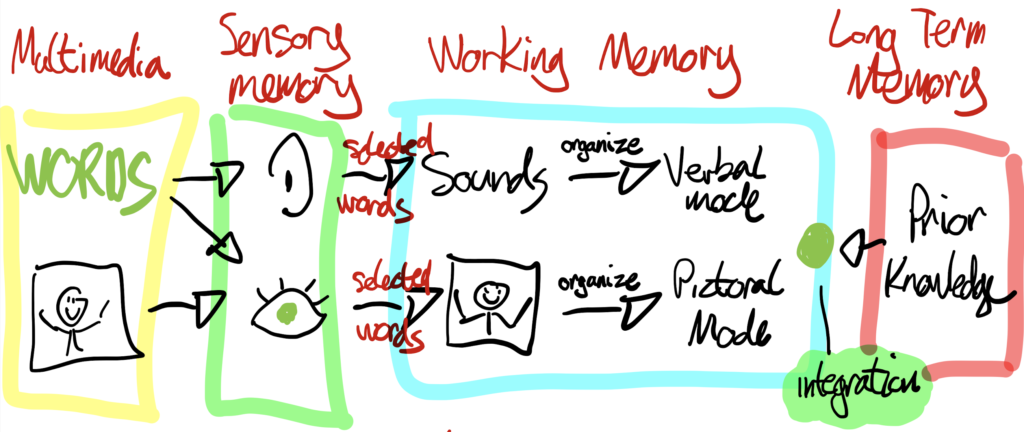
Keep each of those in mind when creating multimedia content from here on out. Referencing how you incorporated these specifically in your assignments is a portion of your grade, plus it is good practice.
Tools for Learning
As we are still getting into our course it is important to explore the vast array of tools and theories available to us. Please look through this list and count how many tools you currently use, and also check out any tools that look interesting to you: Top 300 Tools for Learning. Perhaps bookmark that site. Jane Hart, based in the UK, created the Centre for Learning and Performance Technologies. A project they have run for many years is a ranking of the best tools for personal learning, workplace learning and for education.
Exploring tools such as those in this list is a big part of our course. Often, even if you don’t use them, taking even a few minutes to see a short video or read a review of what these tools do is very beneficial as it gives you a sense of what is possible. How could you use some of these tools? By seeing these ranked in popularity also shows what is trending and how you can be on trend.
Consider using tools from that list for your assignments and in your future practice of creating multimedia content.
Which tools are raising fast? They may be the next household names. Think about how many tools have already faded away: MySpace, ICQ, Ask Jeeves, etc. Yahoo once dominated search and eclipsed Netscape. Today both are essentially gone. Considering tools is important with evaluating if they meet your needs being paramount.
Applying our Learning: Screencasting Creating Multimedia Content
Capturing what is on your screen while adding in a voice over is a core component of teaching. Narrating over top a PowerPoint presentation is a common approach to screencasting. However, capturing dynamic lessons or experiments on your screen are other ideas. Consider the Khan Academy videos as one approach to screencasting. Khan records his screen in the same way he might use a whiteboard in the classroom, showing the progression of mathematical equations, scientific processes, and more.
Also consider assigning your students a project where they could explore and create a screencast. Twitch or YouTube Gaming is very commonly used by people so they are accustom to watching and even making this type of content. Going ‘where students are’ can be an empowering teaching practice too.
There are several ways to do this and programs such as Zoom can be used to do basic screencasting. Screencastify or Screencast-O-Matic both offer a few more options. Please view the following videos then choose 1 program to create your own screencasts. If you use a Mac is is possible to screencast via QuickTime as well. Mac users follow this link to learn more.
Screencast-O-Matic is similar to Screencastify but is not a Chrome plugin. I made the below video to show you how to create with Screencst-O-Matic. This choice is quite easy to use.
Otherwise you can select Screencastify and follow below steps. Both are not needed.
Hands-on Screencasting Activity: Creating Multi-media Content
- Work through this or follow the QuickTime for Mac users link or lastly the Screencast-o-matic. (No need to use more than one but potentially explore each to see what you prefer)
- Note: You will need to use the Chrome web browser as Screencastify is a Chrome plugin. You will not need Chrome for Screencast-o-matic.
- What you screencast is up to you. Some ideas are:
- introduce yourself to your pod with a voice over showing pictures or places
- demonstrate how to use an aspect of a web-based app (i.e Facebook, SnapChat, Trello,)
- voice over how to play a game or an element of a game similar to Twitch (i.e. snipe, beat a boss, find hidden easter egg, etc.)
- use software like MS Word, GMail or even WordPress (Excel example)
- narrate a digital story
- create news cast – viewing sites and summarizing headlines with your own spin
- summarize content from 337 this week and use this as content for your weekly blog
- create something for another class you are in
- More ideas
- Screencast approx. 3 minutes – (on any topic – ideas above are just suggestions)
- When you are finished, you can post it in you weekly blog (optional)
- (Spoiler alert – you may choose to edit your screencast video later so that you can add a title screen, transitions, and intermediate subtitle pages)
How to share a Screencast
If the video is small enough, you can upload it directly into your WordPress site, in the same way you would add a photo/media. If you go this route, the video is best shared as an MP4 file. Apple computers typically output MOV files so you will need to save/export as MP4 or use a conversion program. An MP4 file will play directly on your site, instead of downloading in the case of MOV.
If the video is larger, you may need to consider the use of YouTube as a place to host your video. There is no requirement to setup an account on YouTube for this course, but you may find it a useful tool for sharing video (or you may already have an account if you have a Gmail). Sharing the video as ‘unlisted‘ means it will not show up in search and will only be accessible in the places where you share it. For example, embedded on your portfolio or via a link in an email or instant messaging service. Here is some guidance on sharing an unlisted video.
Weekly Blogging Assignment (#1):
Please complete your weekly blogging assignment before your weekly Pod meeting. Blog posts can reflect on anything from our 337 course. If you get stuck for ideas you may want to try one of the prompts I will provide each week. Prompts are only ideas and you don’t have to choose one:
Weekly blog prompts list: (Use 1 or more if needed in your blog posts this week)
- Outline what you hope to get out of this class, and one thing that you’re unsure about with this class (you can elaborate on what you said about this in your introductory video)
- Use your screencast to double as your blog post if you’d like
- Can you think of an example of an interactive or multimedia learning experience you have experienced yourself that you enjoyed or made a positive impact on you? What made it impactful to you?
- Can you think of an example of an interactive or learning experience that did not involve digital technology that you enjoyed or made a positive impact on you? What made it a positive experience? What made them interesting and engaging?
- If not can you think of ways that they could have been changed to be more interesting and engaging for you at that time?
- Looking at the Top 300 Tools for Learning describe your familiarity with these tools
- Other thoughts or reflections on interactive and multimedia learning from today’s videos and readings?
Requirements recap:
- Length: The blog post should be either 200 words long or contain a 3-5 minute original video or original podcast/embedded audio that you have created
- Post Category: Use edci337–blog
- Please use an academic style of writing and include appropriate citations (links or URLs are also fine).
- Please use at embed at least one image, video, or multimedia object in your post related to what you are writing about (if you are unsure how to do this please attend or view the recording of the optional WordPress lab (see below)
- Use your screencast you just created to double as your blog post if you’d like
- When you comment on others’ posts by creating a new post on your own site and in that new post on your site you include a link to the post you are commenting on. (This will create a ‘trackback’ on the original post)
- Make sure you check the comments on you own site, because you will have to approve them before they are visible. You will see a notification in the side menu of WordPress when you have comments that need to be approved
- For inspiration, please take a look at this strong blog post for EDCI 335, which does a good job including multimedia (a photo, infographic, & YouTube video), links to relevant resources, and appropriately cites articles: https://victorsblog.opened.ca/inclusive-design-meeting-needs-of-all-learners
Task List for This Week
- Read, watch and click ALL content in this post
- Meet your Pod members at the time you arranged and discuss your experiences thus far
- Post a comment on 1 Pod members blog (Assingment 2) offering suggestions and compliments
- Using either Quicktime, Screencast-O-Matic, Zoom or other video host if you prefer, (TikTok, YouTube, Instagram, etc.) create a short introduction screencast video about yourself you can share with your Pod during your weekly meeting. Potentially describe your interests, your field of study and some person information if you’d like. Either share a link or ask your Pod to watch during your Pod meeting this week. Links are above to aid in using screencasting tools.
- Review: Top 300 Tools for Learning
- Review WordPress Resources
- IMPORTANT – Fill out Learning Pathways web form (password in email or Mattermost) to give your informed consent to use the different learning platforms as well it is the only way I know your blog URL to mark it (5 min honest)
- What makes a good blog post? review
- Create Blog Post 1 (Assignment 1) Post a blog post reflection on your OpenETC WordPress site that includes some multimedia. Since you made a screencast you could use that this week for your blog post too.
Bibliography:
5 Examples of Interactive Teaching Styles. (2012, November 2). ResilientEducator.com. https://resilienteducator.com/classroom-resources/5-interactive-teaching-styles-2/
Hart, Jane Top 300 Tools for Learning 2021. www.toptools4learning.com
Juliani, A. J. (2014, January 31). The Hidden Importance of Teaching With Stories. A.J. JULIANI. http://ajjuliani.com/hidden-importance-teaching-stories/
Li, V. (2020). Inclusive Design – Meeting Needs of All Learners – Victor’s Blog. Victor’s Blog. https://victorsblog.opened.ca/inclusive-design-meeting-needs-of-all-learners/
Mayer, R. E. (Ed.). (2014). The Cambridge Handbook of Multimedia Learning (2nd ed.). Cambridge University Press. https://doi.org/10.1017/CBO9781139547369
Mayer, R. E. Personalization Principle Dr. Richard Mayer https://youtu.be/ENGjwO-kKpc
Wikipedia (2021, August 11) https://en.wikipedia.org/wiki/Multimedia
Wisc-Online (2022). https://www.youtube.com/c/wisconline/videos


Leave a Reply